About Watermelon Drop
Watermelon Drop is a free online Puzzle game that runs right in your browser. There is nothing to download and no account to create: press Play and you are in. It works on desktop, laptop, tablet and mobile.
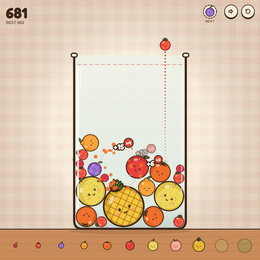
Drop fruit into a glass jar: two of a kind squash into the next size up, from cherry to watermelon. Five jars - Fruit, Sea, Sweets, Garden, Space - each with its own best, on phone and desktop.
How to play Watermelon Drop
- Move the fruit left or right above the jar and drop it.
- When two identical fruits touch, they merge into the next larger fruit, from cherry all the way up to watermelon.
- Each merge scores points; chain reactions score more.
- The game ends when the fruit piles up over the top of the jar.
Controls
- Move the mouse or your finger: aim the drop
- Click, tap, Space or Enter: drop the fruit
- Esc: pause
Tips and strategy
- Keep the biggest fruit in one corner and grow in steps beside it, like in 2048.
- Put small fruit next to fruit of the same kind so they can merge later instead of getting buried.
- Watch the next-fruit preview and plan the drop before the current one lands.
- Try all five jars (Fruit, Sea, Sweets, Garden and Space); each keeps its own best score.
Frequently asked questions
Is Watermelon Drop the Suika Game?+
It is a free browser game in the same style as the popular Suika Game: drop fruit and merge matching pairs until you make a watermelon. It is not an official Suika product.
Is Watermelon Drop free?+
Yes. Watermelon Drop is completely free to play in your browser. You do not need to download anything or create an account.
Can I play Watermelon Drop on my phone?+
Yes. Watermelon Drop works in modern mobile browsers on iPhone, iPad and Android phones, as well as on Windows, Mac, Linux and Chromebook computers.
Is my progress saved?+
Scores and progress are stored locally in your browser on this device. Clearing your browser data will reset them.
Who made Watermelon Drop?+
Watermelon Drop is an open-source game by Tobias Müller (GPTGames), published under the MIT license.
Credits
Created by Tobias Müller (GPTGames). Open source under the MIT license. Source code ↗